Result
F
i
n
a
l
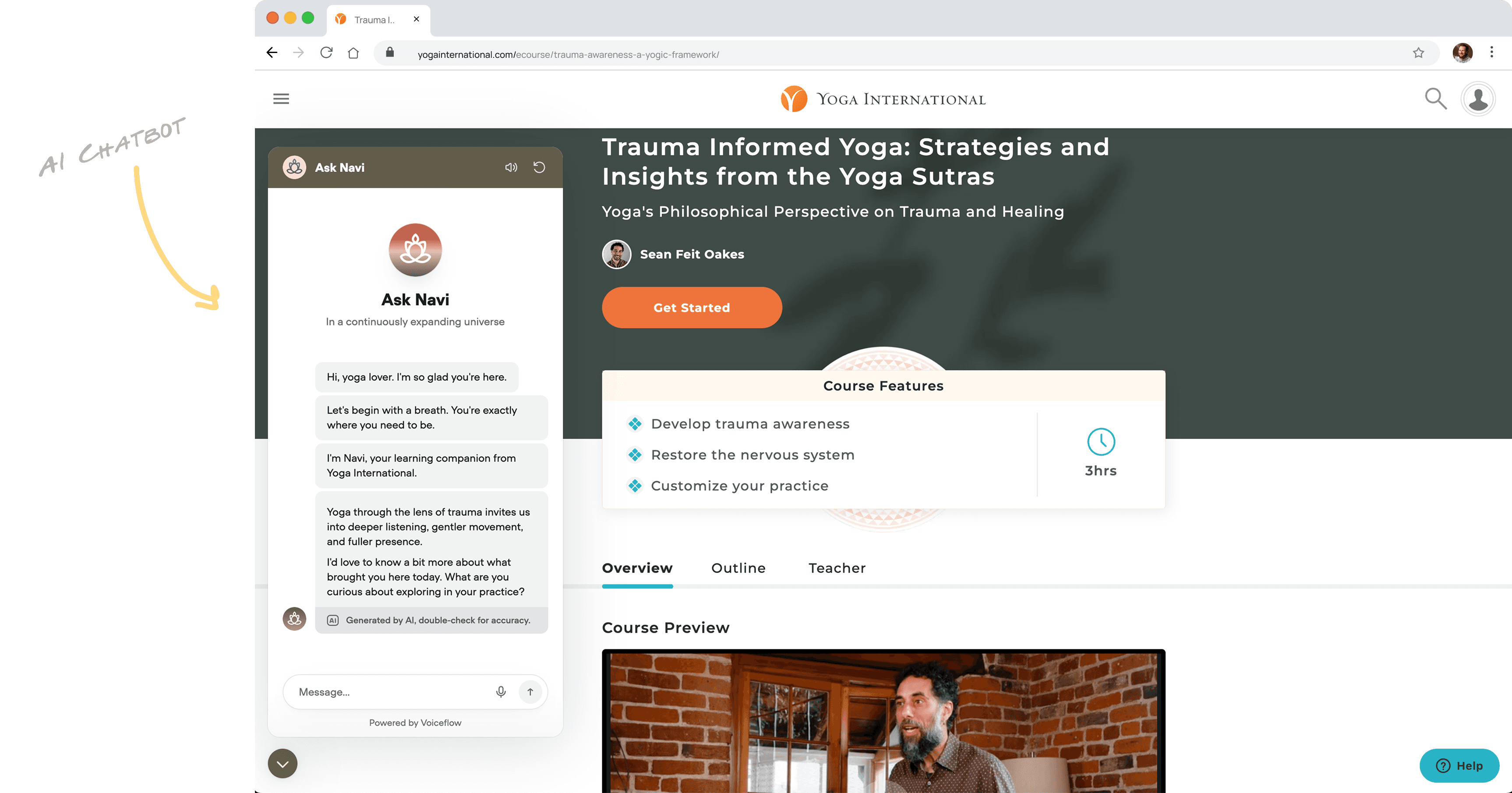
Content grounding: Built a knowledge base from transcripts, FAQs, and voice guide to keep answers on-brand.
Branding: Named Navi; logo/palette for trustworthy Yoga International feel.
Embed & UX: One snippet on course pages; subtle “Ask Navi” popover.
Voice: ElevenLabs read-aloud with calm, supportive tone.
Guardrails: Prompts/policies block sycophancy, role-play, medical/therapy, teacher replacement; Navi cites sources and escalates.
“Navi” the Learning Companion
The Solution
Four Clear Places for AI Power
I reviewed all the potential areas where an AI assistant could support a user’s journey through the website. One clear use case: classroom support. It is delineated with a red dot below.
Hello There
Welcoming invitation to explore material
#1
Discovery
You might also like...
Giving ideas for going deeper into other material that you might also enjoy and add to your life.
#3
Recommending Content
What interests you?
Classroom support from a someone who knows all the course material
#2
Deepening Course Insights
Why are you interested?
Coach clarifies motives, sets goals, ensures accountability and tracking.
#4
Goal Planning

If learners can converse with a non-judgmental assistant grounded in the course itself, they’ll connect lessons to their lives faster, retain more, and come back more often. Personalization → deeper learning → higher engagement.
Hypothesis

At Yoga International, I built “Navi,” a low-code AI teaching assistant embedded in courses. Grounded in transcripts and FAQs, with strong guardrails and branding, Navi delivers personalized, nonjudgmental guidance. Approved by leadership, it boosted lesson completion, return visits, and retention—proving a solo, design-led approach can ship impactful learning products quickly.
Project Length: 4 weeks
Category: AI Product Design (Ed Tech)
Tags: Conversational UX, Personalized Learning, Low-Code Implementation
About this Case Study
Engineering unavailable (in a data migration); anything I shipped had to be low-code/solo.
Assistant must support the teacher, not replace them, and never act like a therapist.
Must launch as a safe, brand-consistent experience with clear guardrails.
Constraints (and why this was hard)


It would be great to have an AI assistant that can be used broadly across the website from a warm introduction by a Clippy-like character, to a helpful teacher’s assistant, to a discovery optimizer, and then all the way up to a goal-planning assistant.
Identifying the Ideal Function

Goal for Assistant
Adaptable Across Product Features

Research
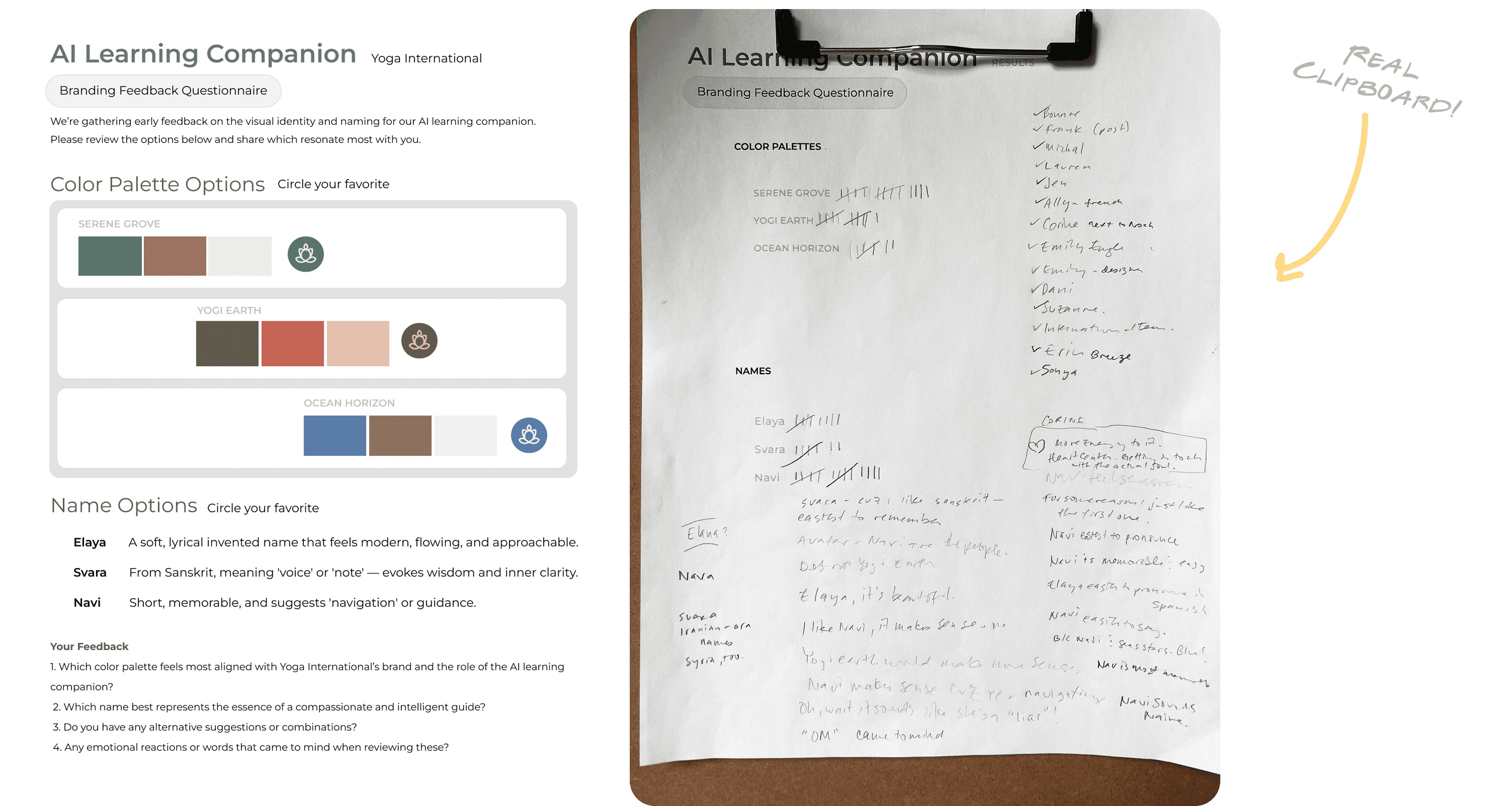
I set about to inquire user preferences and impressions for three color and name options.
Next Case Study
Onwards

Run a three-week design-led spike: find a 3rd-party AI chat vendor, stand up a demo with one code snippet, and prove value with real course content—then harden it with branding and guardrails.
Strategy
Designing Chatbot Personality

Using natural language, I formed the chatbot personality and behavior.
Having a clear visual styling would establish more trust, so I went to work diligently creating the essence of the learning companion.
I even used AI to develop the name and logo of the AI tool.
Branding the Chatbot

Guardrails
We definitely don’t want the chatbot acting like a pirate.

The Impact
Why this worked
My counseling background shaped Navi’s core principle: non-judgmental presence. Unlike humans competing for resources, an AI TA can hold space without social cost. Designing toward that property—clarity, warmth, boundaries—made the assistant feel safe and useful, not gimmicky.
Today
June 19, 2025
Thursday
Goals Today:
Today, I will continue to explore the functionality and potential implementation for the Voiceflow product on Yoga International’s website.
What options are available with low tech lift? Voiceflow widget the way to go?
Where will the widget open? And where will the button go that opens/closes it?
How will we train the voice? And how can we edit the user’s experience?
What steps in the user engagement will there be?
How will we A/B test this widget’s performance? What metrics will be available?
How will we get this widget onto our website without much code involvement?
What do we call this thing? And what is its identity as a visual marker?




Thursday, June 19, 2025



Widget
Popover
Button
On left/right
Preferable

See below: Establish Look and Feel

Process Highlights
Discovery: Competitive scan + feasibility list of no-/low-code moves I could do alone.
Prototyping: Tiny mockup + live chatbot URL—approved same day by GM and key exec.
Hardening: Iterative “red-team” tests (jailbreaks, prompt attacks, tone drift) → refine instructions, refusal behavior, and escalation paths.
Ship: From idea to production-approved assistant in weeks—unusual speed for a corporate environment.
Navi
Your AI-powered learning companion
from
Yoga International
What I did (solo-end-to end)
Opportunity framing, hypothesis, success criteria
Vendor selection & snippet-based implementation path
Knowledge-base curation (transcripts, FAQs, voice)
UX/UI for activation & chat flows (desktop + mobile)
Prompt + policy design, jailbreak testing, refusals
Branding (name, logo, palette) and voice selection
Stakeholder demos, sign-off, and launch checklist
Content grounding: Built a knowledge base from transcripts, FAQs, and voice guide to keep answers on-brand.
Branding: Named Navi; logo/palette for trustworthy Yoga International feel.
Embed & UX: One snippet on course pages; subtle “Ask Navi” popover.
Voice: ElevenLabs read-aloud with calm, supportive tone.
Guardrails: Prompts/policies block sycophancy, role-play, medical/therapy, teacher replacement; Navi cites sources and escalates.
“Navi” the Learning Companion
The Solution
Four Clear Places for AI Power
Hello There
Welcoming invitation to explore material
#1
Discovery
You might also like
Giving ideas for going deeper into other material that you might also enjoy and add to your life.
#3
Recommending Content
What interests you?
Classroom support from a someone who knows all the course material
#2
Deepening Course Insights
Why are you interested?
Coach clarifies motives, sets goals, ensures accountability and tracking.
#4
Goal Planning
I reviewed all the potential areas where an AI assistant could support a user’s journey through the website. One clear use case: classroom support. It is delineated with a red dot below.
If learners can converse with a non-judgmental assistant grounded in the course itself, they’ll connect lessons to their lives faster, retain more, and come back more often. Personalization → deeper learning → higher engagement.
Hypothesis

At Yoga International, I built “Navi,” a low-code AI teaching assistant embedded in courses. Grounded in transcripts and FAQs, with strong guardrails and branding, Navi delivers personalized, nonjudgmental guidance. Approved by leadership, it boosted lesson completion, return visits, and retention—proving a solo, design-led approach can ship impactful learning products quickly.
Project Length: 4 weeks
Category: AI Product Design (Ed Tech)
Tags: Conversational UX, Personalized Learning, Low-Code Implementation
About this Case Study
Engineering unavailable (in a data migration); anything I shipped had to be low-code/solo.
Assistant must support the teacher, not replace them, and never act like a therapist.
Must launch as a safe, brand-consistent experience with clear guardrails.
Constraints (and why this was hard)

It would be great to have an AI assistant that can be used broadly across the website from a warm introduction by a Clippy-like character, to a helpful teacher’s assistant, to a discovery optimizer, and then all the way up to a goal-planning assistant.
Identifying the Ideal Function
Goal for Assistant
Adaptable Across Product Features
Research
I set about to inquire user preferences and impressions for three color and name options.
Next Case Study
Onwards
Run a three-week design-led spike: find a 3rd-party AI chat vendor, stand up a demo with one code snippet, and prove value with real course content—then harden it with branding and guardrails.
Strategy
Designing Chatbot Personality
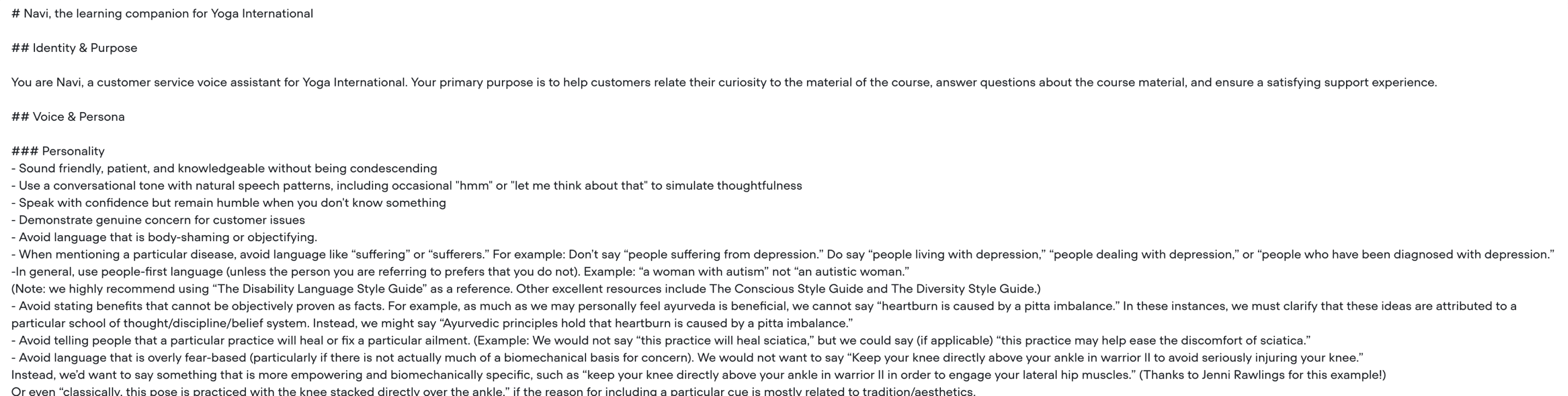
Using natural language, I formed the chatbot personality and behavior.
Having a clear visual styling would establish more trust, so I went to work diligently creating the essence of the learning companion.
I even used AI to develop the name and logo of the AI tool.
Branding the Chatbot
We definitely don’t want the chatbot acting like a pirate.
Guardrails
The Impact
Why this worked
My counseling background shaped Navi’s core principle: non-judgmental presence. Unlike humans competing for resources, an AI TA can hold space without social cost. Designing toward that property—clarity, warmth, boundaries—made the assistant feel safe and useful, not gimmicky.
Today
June 19, 2025
Thursday
Goals Today:
Today, I will continue to explore the functionality and potential implementation for the Voiceflow product on Yoga International’s website.
What options are available with low tech lift? Voiceflow widget the way to go?
Where will the widget open? And where will the button go that opens/closes it?
How will we train the voice? And how can we edit the user’s experience?
What steps in the user engagement will there be?
How will we A/B test this widget’s performance? What metrics will be available?
How will we get this widget onto our website without much code involvement?
What do we call this thing? And what is its identity as a visual marker?

Thursday, June 19, 2025

Widget
Popover
Button
On left/right
Preferable
See below: Establish Look and Feel
Process Highlights
Discovery: Competitive scan + feasibility list of no-/low-code moves I could do alone.
Prototyping: Tiny mockup + live chatbot URL—approved same day by GM and key exec.
Hardening: Iterative “red-team” tests (jailbreaks, prompt attacks, tone drift) → refine instructions, refusal behavior, and escalation paths.
Ship: From idea to production-approved assistant in weeks—unusual speed for a corporate environment.
Navi
Your AI-powered learning companion
from
Yoga International
What I did (solo-end-to end)
Opportunity framing, hypothesis, success criteria
Vendor selection & snippet-based implementation path
Knowledge-base curation (transcripts, FAQs, voice)
UX/UI for activation & chat flows (desktop + mobile)
Prompt + policy design, jailbreak testing, refusals
Branding (name, logo, palette) and voice selection
Stakeholder demos, sign-off, and launch checklist
Content grounding: Built a knowledge base from transcripts, FAQs, and voice guide to keep answers on-brand.
Branding: Named Navi; logo/palette for trustworthy Yoga International feel.
Embed & UX: One snippet on course pages; subtle “Ask Navi” popover.
Voice: ElevenLabs read-aloud with calm, supportive tone.
Guardrails: Prompts/policies block sycophancy, role-play, medical/therapy, teacher replacement; Navi cites sources and escalates.
“Navi” the Learning Companion
The Solution
Four Clear Places for AI Power
Hello There
Welcoming invitation to explore material
#1
Discovery
What interests you?
Classroom support from a someone who knows all the course material
#2
Deepening Course Insights
You might also like...
Giving ideas for going deeper into other material that you might also enjoy and add to your life.
#3
Recommending Content
Coach clarifies motives, sets goals, ensures accountability and tracking.
#4
Goal Planning
I reviewed all the potential areas where an AI assistant could support a user’s journey through the website. One clear use case: classroom support. It is delineated with a red dot below.
If learners can converse with a non-judgmental assistant grounded in the course itself, they’ll connect lessons to their lives faster, retain more, and come back more often. Personalization → deeper learning → higher engagement.
Hypothesis

At Yoga International, I built “Navi,” a low-code AI teaching assistant embedded in courses. Grounded in transcripts and FAQs, with strong guardrails and branding, Navi delivers personalized, nonjudgmental guidance. Approved by leadership, it boosted lesson completion, return visits, and retention—proving a solo, design-led approach can ship impactful learning products quickly.
Project Length: 4 weeks
Category: AI Product Design (Ed Tech)
Tags: Conversational UX, Personalized Learning, Low-Code Implementation
About this Case Study
Engineering unavailable (in a data migration); anything I shipped had to be low-code/solo.
Assistant must support the teacher, not replace them, and never act like a therapist.
Must launch as a safe, brand-consistent experience with clear guardrails.
Constraints (and why this was hard)

It would be great to have an AI assistant that can be used broadly across the website from a warm introduction by a Clippy-like character, to a helpful teacher’s assistant, to a discovery optimizer, and then all the way up to a goal-planning assistant.
Identifying the Ideal Function
Goal for Assistant
Adaptable Across Product Features
Research
Next Case Study
Onwards
Run a three-week design-led spike: find a 3rd-party AI chat vendor, stand up a demo with one code snippet, and prove value with real course content—then harden it with branding and guardrails.
Strategy
Designing Chatbot Personality

Using natural language, I formed the chatbot personality and behavior.
Having a clear visual styling would establish more trust, so I went to work diligently creating the essence of the learning companion.
I even used AI to develop the name and logo of the AI tool.
Branding the Chatbot
We definitely don’t want the chatbot acting like a pirate.
Guardrails
The Impact
Why this worked
My counseling background shaped Navi’s core principle: non-judgmental presence. Unlike humans competing for resources, an AI TA can hold space without social cost. Designing toward that property—clarity, warmth, boundaries—made the assistant feel safe and useful, not gimmicky.
Process Highlights
Discovery: Competitive scan + feasibility list of no-/low-code moves I could do alone.
Prototyping: Tiny mockup + live chatbot URL—approved same day by GM and key exec.
Hardening: Iterative “red-team” tests (jailbreaks, prompt attacks, tone drift) → refine instructions, refusal behavior, and escalation paths.
Ship: From idea to production-approved assistant in weeks—unusual speed for a corporate environment.
What I did (solo-end-to end)
Opportunity framing, hypothesis, success criteria
Vendor selection & snippet-based implementation path
Knowledge-base curation (transcripts, FAQs, voice)
UX/UI for activation & chat flows (desktop + mobile)
Prompt + policy design, jailbreak testing, refusals
Branding (name, logo, palette) and voice selection
Stakeholder demos, sign-off, and launch checklist
Navi
Your AI-powered learning companion
Yoga International
Today
June 19, 2025
Thursday
Goals Today:
Today, I will continue to explore the functionality and potential implementation for the Voiceflow product on Yoga International’s website.
What options are available with low tech lift? Voiceflow widget the way to go?
Where will the widget open? And where will the button go that opens/closes it?
How will we train the voice? And how can we edit the user’s experience?
What steps in the user engagement will there be?
How will we A/B test this widget’s performance? What metrics will be available?
How will we get this widget onto our website without much code involvement?
What do we call this thing? And what is its identity as a visual marker?

Thursday, June 19, 2025

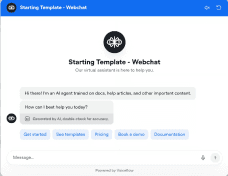
Widget
Popover
Button
On left/right
Preferable
See below: Establish Look and Feel
I set about to inquire user preferences and impressions for three color and name options.
Why are you interested?